Formation and package flying
Keep the broader air picture visible while the simulator cockpit stays focused on flying. VTSD gives nearby aircraft tactical labels, affiliations and trails so group movement is easier to read at a glance.

VTSD turns live simulator traffic into a dedicated 2D air picture for formation flying, intercept training and mission reference work. It is built to sit beside the cockpit view: readable, configurable and focused on tactical context.
For simulator use only. Not for real-world aviation or operational decisions.
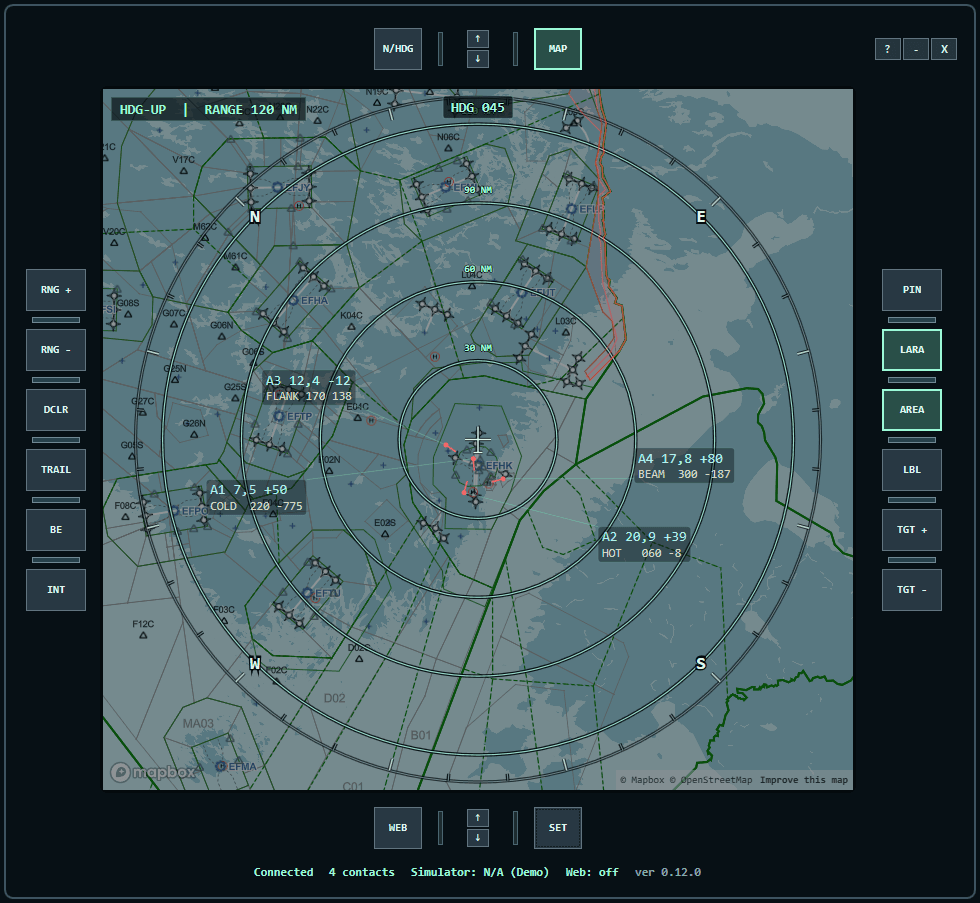
The display combines live traffic, target handling, reference layers and kneepad content into one MFD-style workspace. The goal is simple: reduce context switching and make tactical information easier to read while flying.
Keep the broader air picture visible while the simulator cockpit stays focused on flying. VTSD gives nearby aircraft tactical labels, affiliations and trails so group movement is easier to read at a glance.
Select a target and use heading, bearing, closure and time-to-intercept cues as a training aid. Contacts can be renamed or reclassified without losing the live simulator feed.
Use the kneepad for text pages, images and persistent web pages, then keep airspace layers and bullseye references visible in the same display instead of switching tools.
VTSD is a local Windows application. The cloud dashboard is separate; the flight display itself is installed from the release download and runs with your simulator.
Start the simulator and launch the VTSD Windows app.
Choose SimConnect, X-Plane 12 Web API or XPUIPC as the data source.
Tune the tactical picture: range, orientation, labels, layers and target trails.
Keep it on another monitor, pinned over the cockpit, or mirrored to a tablet on the local network.
Position, speed, heading and altitude come from the selected simulator connection. VATSIM can optionally add matching callsigns from its public feed, while the tactical picture remains based on simulator data.
SimConnect
Direct SimConnect integration bundled with VTSD.
Local Web API
Reads aircraft and traffic through X-Plane 12's local Web API.
XPUIPC
Supports older X-Plane installations through the XPUIPC plugin.
The front page keeps the story first, but the app remains a practical utility: target interaction, airspace references, kneepad pages, tablet mirroring and cockpit-friendly controls are all part of the same download.